 I love Audible.
It’s a fantastic way to absorb books. A few years ago I had a daily cycle commute across Copenhagen which meant I was cycling for almost an hour every day. During this time Audible helped me use this time to devour books.
However since then I’ve moved apartments and jobs. I still find Audible valuable, I just can’t get through audiobooks in the way that I used to. I’ve often found my Audible credits are building up faster than I can get through audiobooks.
Updated October 2026: Audible has changed a lot since I first wrote this post in 2020, so I’ve rewritten it. Pausing is now much easier, and Audible UK has changed how credits work.
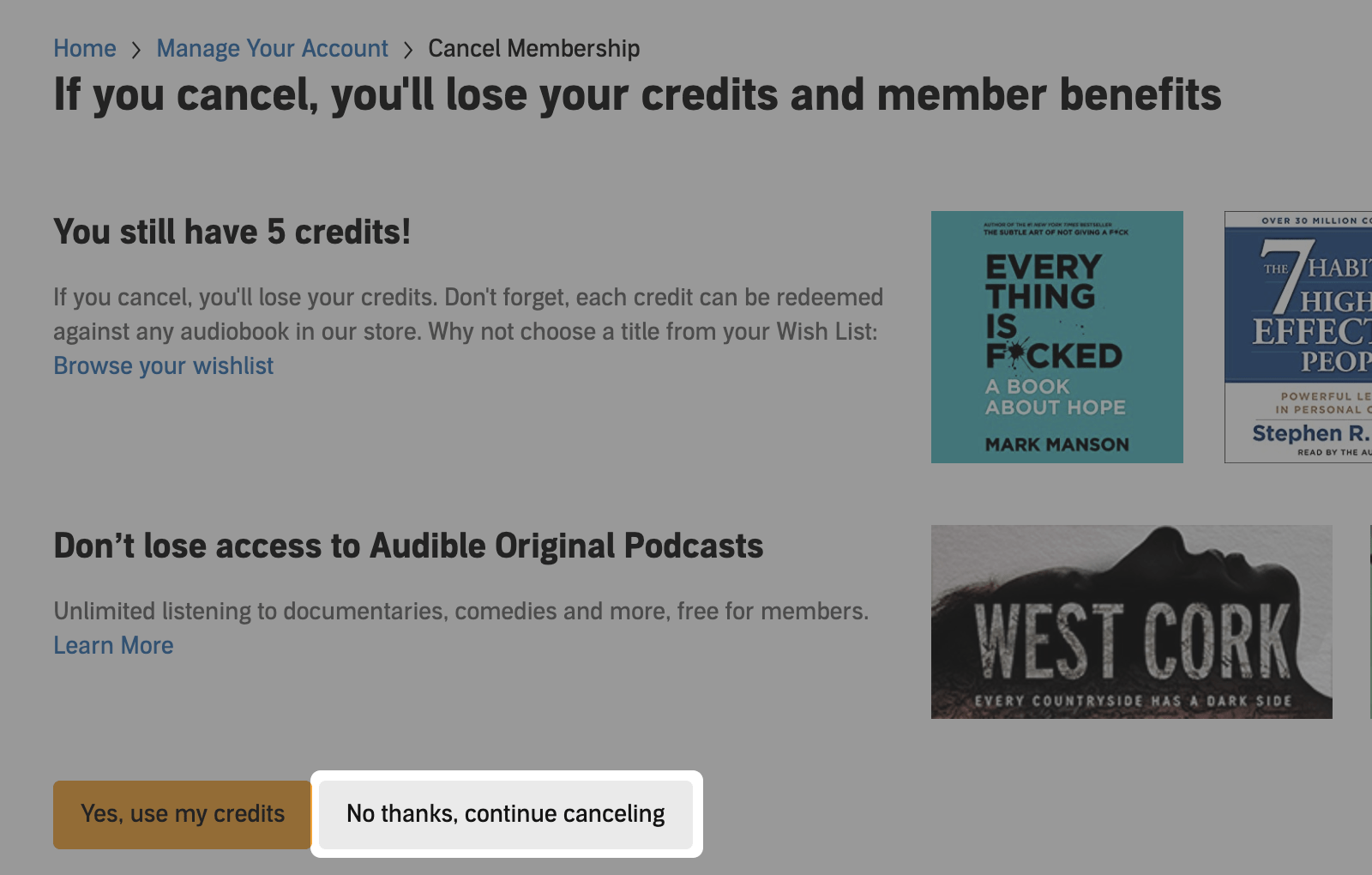
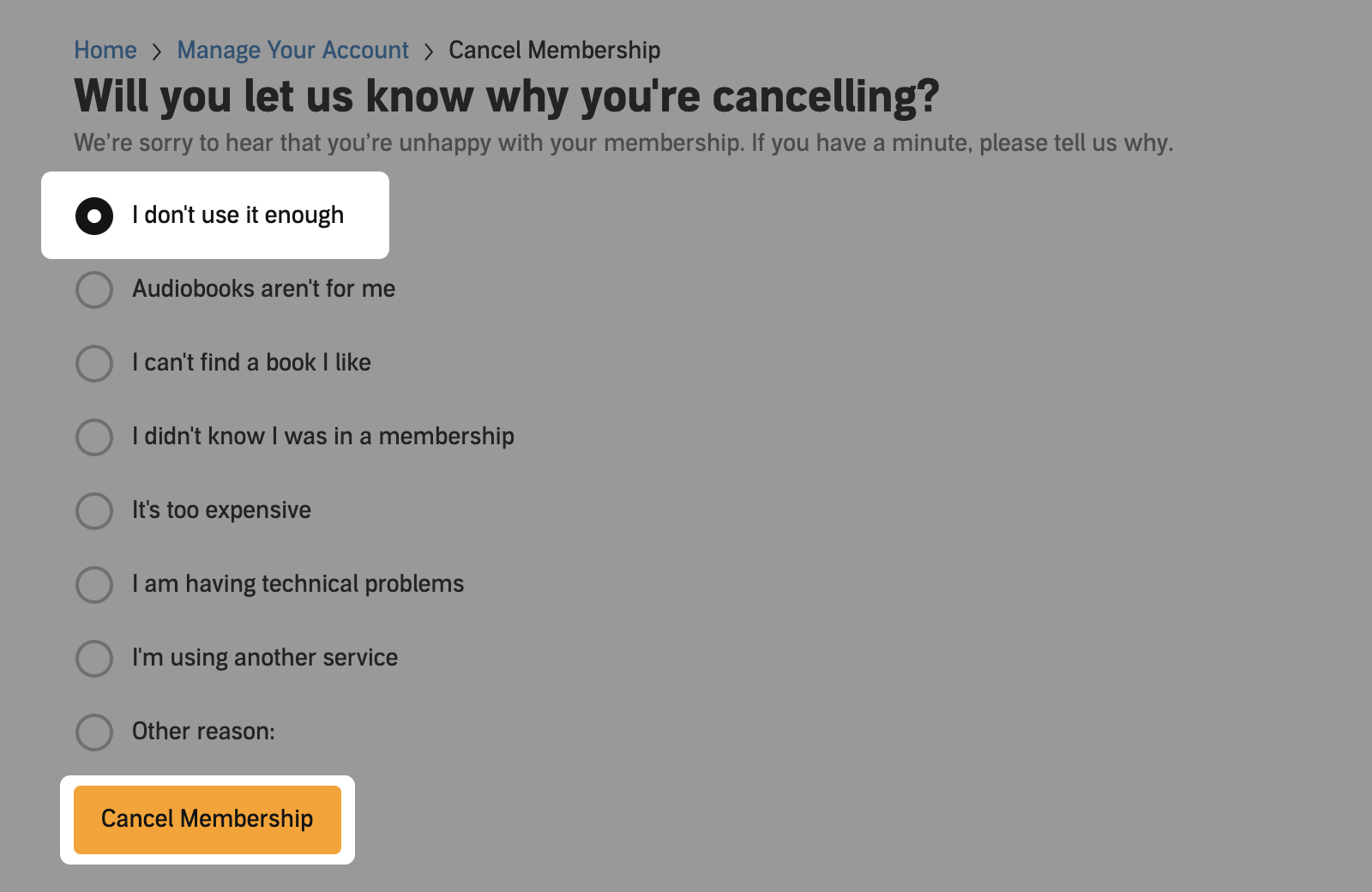
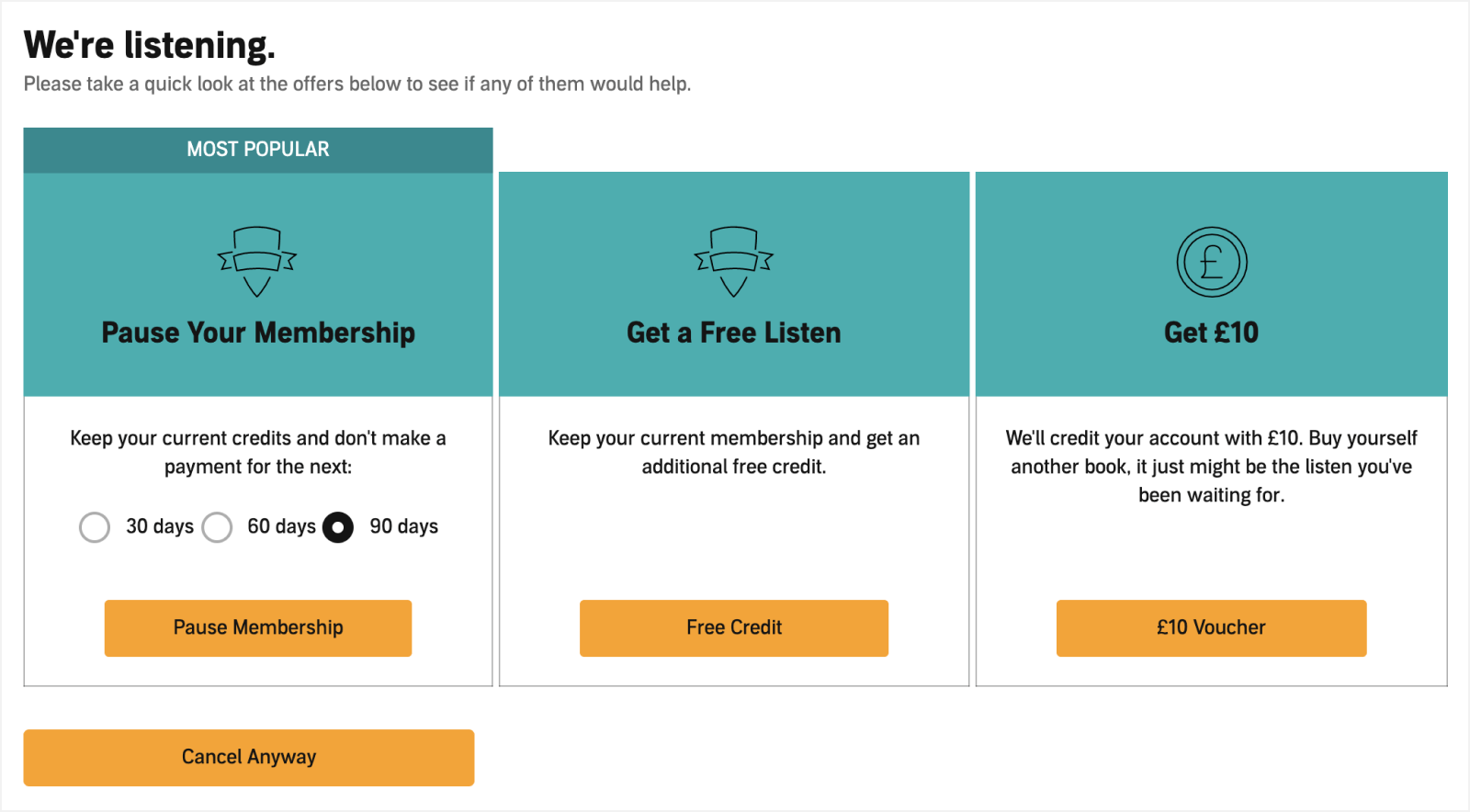
When I first wrote this post, there was one thing I didn’t like about Audible: the dark patterns it used to keep people from leaving. In fact I’d argue they were downright nefarious. The option to pause was buried at the very end of the cancellation process, and at every step Audible’s design did its best to obscure your choices. You were repeatedly told that if you cancelled, you’d lose your valuable credits. You can see what it looked like further down.
The good news is that Audible has since moved the pause option somewhere you can actually find it. There’s now a Pause membership link on your account page, and you can pause in the Audible app too. You don’t need to go anywhere near the cancellation process.
How to pause your Audible membership
On the Audible website
- Sign in to your Audible account.
- Select your name at the top of the page, then choose Account details. On some Audible sites, including audible.com, this is called Membership details.
- Select Pause membership.
- If you’re asked how long to pause for, choose 30, 60 or 90 days. Then select Pause membership again to confirm.
In the Audible app
- Go to your Profile, open the Membership tab and select Manage.
- Select Pause membership and choose 30, 60 or 90 days.
- Confirm the pause.
That’s it. While your membership is paused you won’t be charged and you won’t get any new credits, but you can still spend the credits you have and listen to everything you own.
If you change your mind, you can resume at any time. On the website, select Resume membership in your account details. In the app, go to Profile, then Account, then Resume membership. Payments start again from your next billing date.
Things to know before you pause
- You can pause for up to 90 days. In the UK you can pause once every 12 months, and the 12 months start from the day your membership resumes. In the US you get up to 90 paused days in any 12 months, which you can split across up to three pauses.
- You need to have paid for at least 30 days. If you’re still on your free trial, you can pause the trial for 30 days instead, which extends it. In the UK, you’ll find this option behind the Cancel membership link.
- Annual plans can’t be paused. More on that below.
- You’ll lose access to the Plus Catalogue, the audiobooks and podcasts included with your membership, until you resume. Anything you’ve bought with a credit or cash stays in your library.
- On the cheaper Standard plan, you won’t get a new monthly title while you’re paused, and the titles you’ve already picked are locked until you resume.
- If you pay through Apple’s App Store or Google Play, different rules apply. In the UK, your pause starts from your next billing date. In some countries, including Canada, you can’t pause at all.
The rules vary a little from country to country, so if you’re not sure, check Audible’s help page for your country, for example Audible UK or Audible US.
What happens to your credits?
This is the part that has changed the most since 2020.
In the UK, Audible credits no longer expire after 12 months. Instead, there’s a limit to how many you can save up. On the one-credit-a-month plan it’s 6 credits, or 12 if you get two credits a month. If you’re already at the limit when your next payment goes through, you lose a credit, so you end up paying for a credit you can’t keep. If your credits are piling up, that’s the perfect time to pause.
In the US and Canada, credits still expire 12 months after they’re issued, and pausing doesn’t stop the clock. If you have credits that are close to expiring, make sure you spend them.
Wherever you are, if you cancel your membership, you lose any credits you haven’t spent. Anything you’ve already bought with your credits stays in your library, even after you cancel.
What about annual Audible plans?
If you have an annual Audible plan, you won’t be able to pause your membership. This is because you’ve effectively paid for the whole year upfront. However you can cancel your membership and you’ll still be able to keep and access any audiobooks in your library, even without a membership. Just make sure you spend your credits before you cancel, as you’ll lose any you haven’t used.
How pausing used to work
For the record, here’s what pausing Audible looked like in 2020. Please don’t follow these steps today. Use the Pause membership link instead.
Back then there was no pause link. Instead, you had to select Cancel membership and work your way through Audible’s cancellation process. The first page warned that if you cancelled, you’d lose your credits. Your credits were still perfectly safe at this point, but the page was designed to make you think twice.
Next came a survey asking why you were cancelling, with a Cancel Membership button that felt very final.
Only then, on the very last page, were you finally offered the option to pause, alongside a couple of offers to tempt you to stay.
Looking for a way to use up your spare credits?
If you have a few credits to use up and would like some book recommendations, these are some books I’ve thoroughly enjoyed on Audible:
- Good Strategy Bad Strategy by Richard Rumelt
- Putin: Prisoner of Power by Misha Glenny (free for members, so it won’t use a credit)
- Alchemy: The Surprising Power of Ideas That Don’t Make Sense by Rory Sutherland
- Atomic Habits by James Clear
- The Design of Everyday Things: Revised and Expanded Edition by Don Norman
- At Home: A Short History of Private Life by Bill Bryson
- Build: An Unorthodox Guide to Making Things Worth Making by Tony Fadell
Leave a reply